


IN SHORT
- Failover and switchover for PostgreSQL, like MariaDB. PostgreSQL servers are monitored as a cluster in three topologies, active-passive, WAL streaming and logical replication, with their own switchover, failover and rejoin path: 26 to 31 s for a WAL streaming switchover, 8 s for a failover, the former primary back by
pg_rewind; 2 to 3 s for a logical switchover. Every step through the API, HAProxy repointed, health confirmed, measured on the preprod cluster with traffic on. - Backup archive plugins. Several archives per cluster from plugins, restic, plakar and Proxmox Backup Server with a token per cluster; snapshots of the backup directory under your retention policies; backups kept in the archive only and fetched back for a restore; snapback; one global catalogue of every backup; binlog continuity tracked so a point-in-time restore never stops short silently.
- Nothing of ours in your database. The jobs script on each database host takes its tasks and reports through the API by default: no job table written in your data, nothing of the tool in your backups.
- Logical backups close to physical backup speed. splitdump 4.6 times faster, a per-table dump of 8 GB in 2 min 49 s against 2 min 03 s for the physical copy, with a live progress pill and encryption at rest for the local backups.
- MCP in the API. The replication-manager tools for an AI assistant, one tool per route under the user's ACL: clusters, databases, proxies, backups, applications from templates, Cloud18 self-service. Scripts, CI jobs and the MCP server authenticate with user-issued API tokens that carry a subset of the user's grants, no login call.
- Cloud18 dynamic resources. Every axis resized live under the plan, the plan ledger gating what is sold, the wait metrics of each service graphed next to its consumption, and the thread pool sized from them under semi-synchronous replication.
- Security. The database configuration archive needs a token by default (since 3.1.43); in 3.1.44, replication TLS that follows the primary's certificate, no root password in rendered configurations, and no automatic restore over a node holding data.
1. ON EVERY ORCHESTRATOR
Whatever runs your databases, on premise, OpenSVC or Kubernetes, these land in 3.1.45.
Download the article as a PDF (18 pages)
1.1 BACKUP ARCHIVE PLUGINS
Several archives per cluster, from plugins. A cluster no longer has one restic repository wired into its settings: it has a list of archives, each created from its connection infos, named by you (archive-bso-s3, archive-rdem-pbs), edited, renamed, attached, detached or removed from the Maintenance tab or the API. Each archive comes from a plugin that declares its settings, its secrets and what it can do, and the forms are drawn from it. restic on a local folder, SFTP or S3 is built in; plakar (local folder or S3, its engine embedded, no plakar program to install) and Proxmox Backup Server (pure Go, no proxmox-backup-client) ship as signed enterprise plugins. On Proxmox Backup Server each cluster gets its own token, limited to its own namespace: one cluster never reads nor deletes another's backups.
A snapshot is your backup directory in time. After each backup the attached archive takes a snapshot of the server's backup directory: the backup, the binlog copies it holds at that moment, its records.
Backups and binlogs, each its own retention. Three windows, set apart on purpose so short binlog retention never costs you a backup:
- Backups in the archive follow your retention policy, one per cluster,
backup-keep-*: by default the last 10, plus 1 hourly, 1 daily, 4 weekly, 12 monthly and 2 yearly. - Binlog-only snapshots, taken between backups to keep the binlogs copied since, follow their own tagged policy, by default
trigger:binlogs keep-within=1d. They are counted apart, so they never push a backup out of its policy, and the ones taken since the last backup are always kept: a binlog only extends a backup, the chain from it is never cut. - Binlog copies in the backup directory follow
backup-binlogs-keep, the 10 last binlogs by default, and each copy is removed only once a snapshot holds it.
Other tags can get a policy of their own the same way (the Archive button, a snapback), and an archive can carry its own purge policies instead of the cluster's.
Keep the backup in the archive only. With backup-archive-remove-original a backup is deleted from the backup directory once the snapshot is checked to hold it, and a restore or a reseed fetches it back from the archive first. Our regression test does it end to end under sysbench: a mysqldump, a mydumper and a mariabackup backup of the primary, each archived, its original removed, and a replica reseeded from it, replicating at the end.
Under sysbench, end to end. The regression test testBackupArchiveRemoveOriginal, on our three-node MariaDB 11.8.9 test cluster (OpenSVC, 2 DBU per node, ProxySQL), with sysbench oltp_read_write, 16 threads, writing on the primary through every phase. Each phase backs up the primary, pushes the backup to the archive, removes the original once the snapshot is checked to hold it, stops a replica and writes rows it misses, reseeds the replica from the archived backup, and checks the replica holds the primary's data and replicates. Today's runs, on the final code:
| Archive | Jobs | mysqldump phase | mydumper phase | mariabackup phase | Total | sysbench TPS per phase | Result |
|---|---|---|---|---|---|---|---|
| restic, local folder | sql | 2 min 33 s | 3 min 06 s | 3 min 09 s | 9 min 00 s | 196 / 194 / 177 | PASS |
| restic, local folder | api | 4 min 39 s | 2 min 32 s | 4 min 38 s | 11 min 49 s | 164 / 196 / 191 | PASS |
| plakar, S3 | api | 4 min 39 s | 2 min 38 s | 3 min 22 s | 10 min 39 s | 31 / 162 / 178 | PASS |
The physical reseed is a partial restore of the archived mariabackup into the running replica. The first phase of the plakar run ran at 31 TPS, 506 ms of average latency, against 80 to 100 ms in every other phase: we are looking into it.
Snapback. A server's backup directory put back exactly as it was in a snapshot, on every archive kind, to restore from what it held then. While it is there, that backup directory is read-only: no backup is written into it and nothing of it is pushed to the archive, so the history after that snapshot is never overwritten, and the snapshot it stands on and the latest one cannot be deleted by hand. A state says so, until a snapback to the latest snapshot puts it back to today, or a release keeps it as it is and opens it again. It is done from the Maintenance tab, on any snapshot of the attached archive, or through the API.
One catalogue of every backup. replication-manager keeps a global backup catalogue in its working directory, outside the backup directories: every backup and every archive's snapshots. It is rebuilt from the archives themselves when needed, reading the backup records each snapshot holds; a snapshot an archive's own purge deleted leaves the catalogue with it, and a difference between the catalogue and an archive is a state you can resolve with Drop missing. The Maintenance tab shows for each backup where its restore will come from, local, remote or archive, and what it allows: compressed, encrypted, parallel, partial restore.
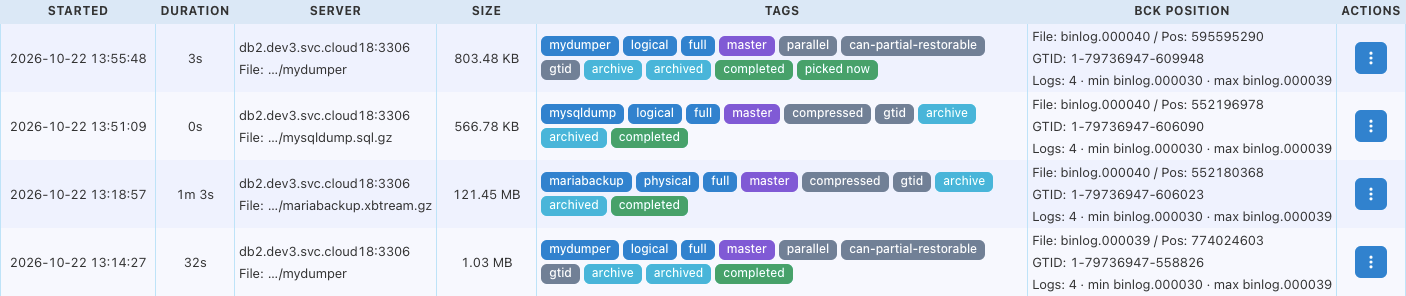
Better lose binlogs than backups. Binlog copies never stop and never wait for the archive: a rotation queues the binlog it closed and returns at once, one worker per server copies them. A copy is removed from the backup directory only once a snapshot holds it, and a binlog-only snapshot is taken for copies beyond the keep window. When space or a refused snapshot forces a copy out anyway, or when the database purged a binlog before it could be copied, the hole in the archive's binlog continuity is recorded as a state until the next backup in the archive closes it: a point-in-time restore will never silently stop short.
1.2 BACKUP IMPROVEMENTS
Nothing of ours in your database. replication-manager runs its maintenance on each database host through a small jobs script: backups, reseeds, restarts, log collection. Until now the default way to hand it a task was a table in your own database, replication_manager_schema.jobs: replication-manager wrote a row, the script polled the table and wrote its result back. That table lived in your data, went into your backups, and a restore had to know what to do with rows that belonged to the tool, not to your application. The product that writes your backups should not write into the data it backs up.
From 3.1.45 scheduler-jobs-mode defaults to api: the script asks the replication-manager API whether a task waits for it, opens the stream it needs, and reports its state and its logs through the API. Nothing is written in your database for the jobs. It also keeps working when the database is down: a job that starts the server, or collects the error log explaining a crash, no longer needs the database up to be picked up. On premise, over SSH, the script follows the new mode at its next run. In a jobs container (OpenSVC, Kubernetes) the mode is part of each database service's configuration: a jobs upgrade pushes it, or set scheduler-jobs-mode = "sql" to keep the former mode.
The backups folder on S3. A cluster's backup directory can live in a bucket, mounted inside replication-manager itself; a registered replication-manager reaches the Cloud18 storage with its Cloud18 login, no key to hand out. The mount is built so a slow or unreachable storage answers an error in time and never freezes the monitoring.
Provision a cluster from another one's backup. A child or staging cluster is seeded, and reseeded later, from its parent's backup, a splitdump or a single file: the restore positions its master on the link to the parent before the load, so it replicates from the parent at the right place; and the new cluster is sized from its plan, not from defaults.
A restore that does not flood its binlogs and its replicas. The child's master is restored with its binary log on, so its replicas receive the data as it loads, and three things keep that load from drowning them:
- Binlogs bounded. During the restore the master's binlogs are held to 2 GB in total (
max_binlog_total_size, MariaDB 11.4 and later), and given back their usual bound after: under dynamic configuration 25 % of the plan's disk by default (prov-db-binlog-total-size-pct), otherwise the value they had before. A large restore never fills the disk with binlogs. - Paced on the replicas. At each binlog rotation the load pauses, and resumes only once every replica has applied the rotated binlog, with no delay; a replica already stopped or behind does not hold it back. The replicas are never left gigabytes behind.
- Semi-sync paused on the master for the restore, and set back after: on our preprod an 858 MB splitdump loaded in about 12.5 minutes this way, against 16.5 with it on.
A restore can be cancelled. A logical reseed that has started, on a replica or from the parent, stops on request (job-cancel), the dump client with it.
What the tests found on the way. Running these backups and reseeds again and again under load turned up older problems, fixed here: a physical reseed whose task the jobs script picked up within a second never got its backup stream (the replica waited ten minutes, then gave up, nothing changed); a global backup slot that leaked forever when the monitor missed one ping of the server during a backup, a bug from 2019; replicas never purged their binlogs on MariaDB 11.4 and later; a data disk could not be grown while the database was down, exactly when it is full; and a physical reseed now restores replication-manager's own schema too, except the server's job table.
splitdump, 4.6x faster. If you run MariaDB or MySQL with replication-manager, you may know splitdump: our tool that turns a mysqldump into one or multiple compressed files per table, with a manifest, foreign-key ordering and DEFINER handling on restore. It runs standalone on any existing dump, replication-manager-cli splitdump, or on every backup of a cluster with one setting. Our clients use it in production for partial restores, one table or one schema out of a full backup, and for MySQL to MariaDB migrations, where the DEFINER fallback does the heavy lifting.
This week we gave it the attention it deserved. Same 8 GB database, same host, same gigabit link:
- before: 13 min 03 s, compression on a single core at 99 %
- after: 2 min 49 s, 300 Mb/s on the wire, every core busy
Files stay standard gzip, restore is unchanged, nothing to migrate. For comparison, the physical backup of the same database with mariadb-backup took 2 min 03 s end to end: a per-table logical backup, the one you can restore table by table, now runs in the same range as the physical copy.
Encryption at rest for local backups. The backups kept on the server's own disk, the ones not yet archived, also get encryption at rest, by Ahmad. backup-encryption = true encrypts every artifact replication-manager writes on its own disk, physical backups, logical backups with any tool, mysqldump, mydumper, dumpling, splitdump, your own save script, and the local binlog copies, in the OpenSSL-compatible AES-256-CBC format, so a plain openssl enc -d reads them if you ever have to. No new secret to manage: the key is your database root password, never written to metadata, never exposed by the API, never passed on a command line, and each artifact records the password version it was written with, so a backup taken before a password rotation still restores. Independent of the restic repository's own encryption, and nothing touches the database files in place.
Backup progress. A live pill for every running backup: how long it runs, bytes against the previous backup, then table by table from the dump itself, with a per-table throughput kept as history. Watching that pill is how we found that splitdump crawled. Physical backups report too: mariadb-backup and xtrabackup show the bytes of their stream as they arrive, against the size of the previous run, with rate and time left.
MySQL and Percona 8.4 logical backups. A logical backup of an 8.4 server could hold the global backup slot forever, waiting for a binlog position the dump header no longer carried in the expected form. Both header forms are now read, and a dump without a parsed position completes with a warning.
BELAIR LOGICAL DUMP TESTS, 2026-10-05
Database: 8 GB (7.1 GB data + 1.4 GB index in information_schema, 116 tables, 10.8 GB on the ZFS dataset). Source db1 on s18-fr-4, destination the repman active on s18-fr-6, 1 Gb/s private link. The curve is the new internal network series of db1, one sample per sensor push (60 to 80 s apart), so a short run is under-sampled and its peak is a floor.
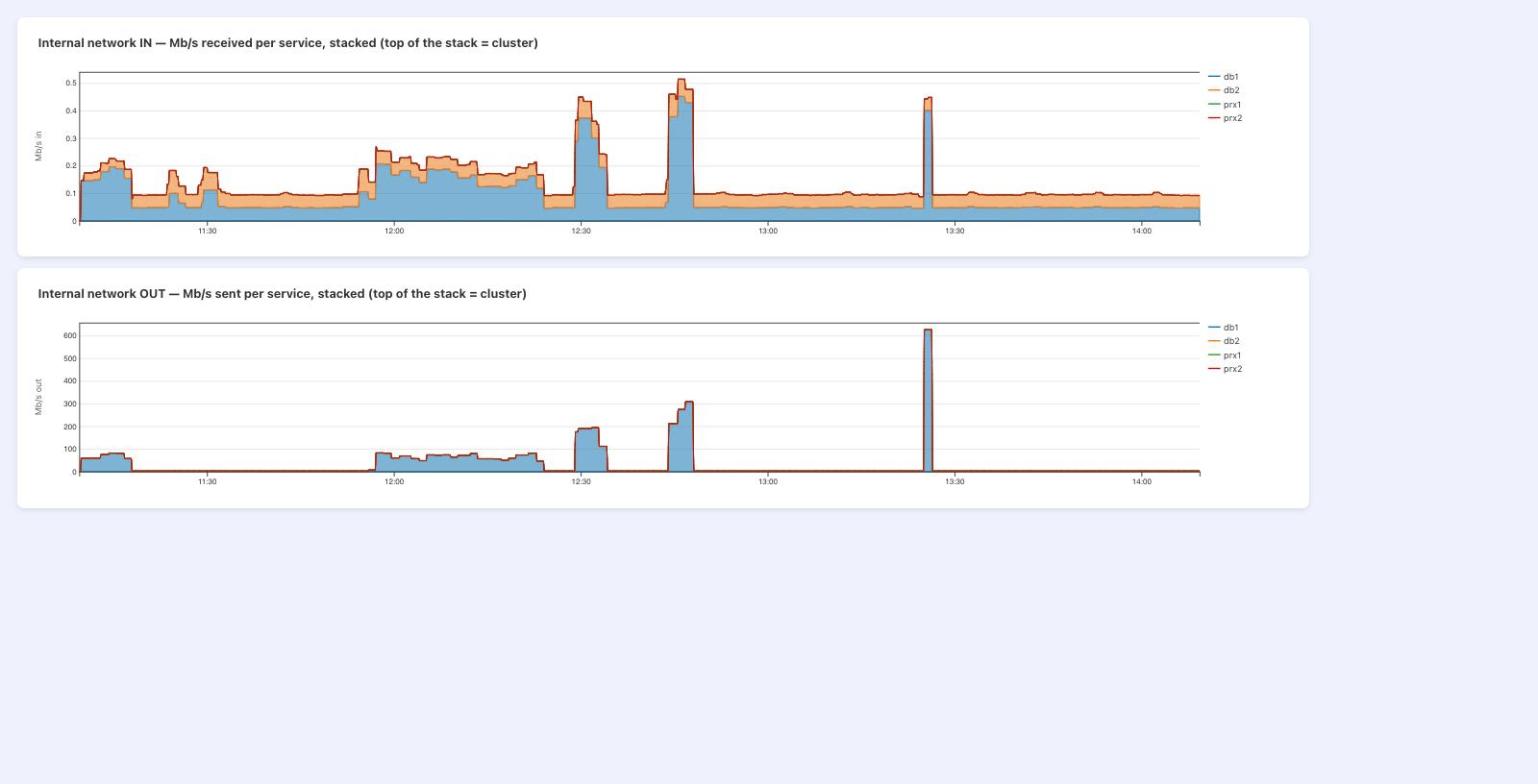
| run | mode | start | finish | duration | data rate (8 GB / time) | wire out of db1 | what limited it |
|---|---|---|---|---|---|---|---|
| 1 | splitdump, before | 09:04:19Z | 09:16:32Z | 12 min 13 s | 92 Mb/s | peak 85, avg ~65 Mb/s | replication-manager-cli splitdump at 99 % of one core: the stdlib gzip writer ran in the goroutine that also parses every line |
| 2 | splitdump, before | 09:55:56Z | 10:08:59Z | 13 min 03 s | 86 Mb/s | peak 81, avg 67 Mb/s | |
| 3 | splitdump, before | 10:09:18Z | 10:22:37Z | 13 min 19 s | 84 Mb/s | peak 80, avg ~63 Mb/s | |
| 4 | plain dump (pgzip) | 10:28:16Z | 10:32:39Z | 4 min 23 s | 257 Mb/s | peak 193, avg 185 Mb/s | the plain path's in-line stream parser plus pgzip at the configured level; mariadb-dump at 29 % CPU |
| 5 | splitdump, after (parallel pgzip) | 10:43:57Z | 10:46:46Z | 2 min 49 s | 400 Mb/s | peak 307, avg 263 Mb/s | compression across every core (pipeline 90-95 % total); remaining ceiling = splitdump's single-threaded line parser and mariadb-dump's single SELECT stream; link at 30 % |
| 6 | mariadb-backup (physical, stream to the manager) | 11:22:25Z | 11:24:28Z | 2 min 03 s | 520 Mb/s at least | peak 620 Mb/s | not profiled. Start = backup request, finish = artifact received and handed to the archive, so the duration includes the wait for the job to start on the database node; the copy itself is shorter. Physical copy of the data files, no SQL, no per-table parsing |
Runs 1 to 3: 10 MB/s on one core. Run 4: the same data without splitdump, 3x faster. Run 5: splitdump with per-table files compressed by parallel pgzip (commit 3958fa5d9), faster than the plain dump; the files stay standard gzip. Run 6: the physical backup of the same database with mariadb-backup, for comparison: about 2 minutes end to end, the 620 Mb/s spike at 13:25 on the chart. A physical backup restores the whole instance; it is not a substitute for a per-table logical dump.
1.3 MONITORING IMPROVEMENTS
Internal network view. Every database, proxy and app reports what it receives and what it sends on its own interface, stacked per service, in and out kept apart. On day one it exposed a replica stream re-sent every five seconds for eleven months.
Binlog streams that behave. That re-sent stream was ours: an active and a standby replication-manager both read the primary's binlog with the same replica server-id, the database killed each other's stream every five seconds, and each reconnect restarted from the head of the file, 1.7 TB in five days. In 3.1.45 only the active monitor opens the event scanner stream, a standby closes it; a reconnect resumes at the primary's current position, not at the start of the file; and repeated resets arm a backoff, 30 seconds doubling up to 30 minutes, with a warning that names the server-id and every kind of consumer that can collide on it: a replica, another replication-manager, a binlog fetch. Several replication-managers can now watch the same cluster, one active and the others standby, without stepping on each other's binlog streams: the multi-manager active/standby setup is a supported feature.
A replica server-id pool. Every binlog consumer of replication-manager, the event scanner, binlog metadata, restore lookups, the binlog backup copy, the rejoin fetch, now leases its replica server-id from one pool per cluster, eleven ids starting at check-binlog-server-id and shifted per replication-manager instance, released when the stream closes. It replaces the fixed offsets and the hard-coded ids. An exhausted pool refuses and raises a warning, it never steals an id in use. If you run a standby replication-manager next to the active, this is the upgrade that stops them fighting over your primary.
A backup no longer pauses the monitoring. replication-manager can simulate traffic on the primary through the proxies, test-inject-traffic, to prove the write path end to end. Until now that marker was a pseudo-GTID CREATE OR REPLACE VIEW: DDL, so every marker is a binlog event that flashback cannot reverse, and a DDL waits on the metadata lock a running backup holds. On a cluster using it, a backup silently froze the cluster's monitoring loop for its whole duration, no refresh, no failover decision. 3.1.45 moves the marker to a single-row REPLACE by default, flashback-safe and lock-free; the DDL form stays available by parameter for positional, non-GTID replication, and opens a warning while in use. The marker now also runs outside the monitoring loop, so nothing a backup holds can stall it. If your replication-manager simulates traffic in production, check inject-traffic-mode after you upgrade, and ask yourself whether the simulation still earns its place there.
MCP, on premise. replication-manager ships an MCP server: your AI assistant talks to your clusters with the exact grants of the user it logs in as, one tool per API route, never more. On premise that covers the whole day of a DBA: list and inspect clusters, databases and proxies, read topology, health, alerts, replication status, variables, processes, slow queries and error logs, check whether a node is master, slave or late; then act, switchover and failover, rolling restart, rolling upgrade with the target image taken from your own configurator list, rolling reprovision, read-only or maintenance on a node, kill a query, logical or physical backup, splitdump backup, restore from either, archive fetch, purge and unlock, checksum tables, bootstrap or clean up replication, rotate passwords, change a setting. The backup progress and the internal network view above are read the same way.
API tokens. A user issues bearer tokens for their own account from the dashboard, the CLI or the API: a label, the grants it carries (a subset of the user's own, re-checked at every call), the clusters it may reach, and a lifetime. A script, a CI job, the MCP server or the CLI sends Authorization: Bearer <token> and never logs in, every call stays attributed to the user, and a token survives a restart of replication-manager where a session JWT does not. Revoke one, and it stops at the next call. Documentation: https://docs.signal18.io/security/api-tokens.
MariaDB 12 tested. We ran MariaDB 12.3 on our three-node test cluster: a rolling upgrade from 11.8.9 to 12.3.3, node by node, replication healthy at the end, about three minutes. Monitoring, replication handling and the rolling upgrade itself needed no modification of the replication-manager code for MariaDB 12.
1.4 POSTGRESQL
What replication-manager offers on PostgreSQL today compared with MariaDB (✓ tested, ◐ partial, ✗ not available):
| Area | MariaDB | PostgreSQL |
|---|---|---|
| Topology discovery, lag, replica state, health alerts | ✓ | ✓ |
| Processlist, variables, tables and sizes | ✓ | ✓ (processlist from pg_stat_activity, a mapped subset of variables) |
| Slow log, query digest, performance schema | ✓ | ✗ |
| Transaction log archive (binlog copy / WAL archive), PITR | ✓ | ◐ WAL archive shipped to replication-manager with backup-binlogs; PITR restore planned; no scan/flashback (no binary log) |
| Switchover, failover, rejoin | ✓ | ✓ WAL streaming and logical |
| Semi-sync, GTID, delayed and multi-source replicas | ✓ | ✗ (no equivalent) |
| Logical and physical backups with progress | mysqldump, mydumper, mariabackup, xtrabackup | pg_dumpall, pg_basebackup |
| Restore and reseed from a backup | ✓ | ✓ physical restore (pg_basebackup tar, then standby of the primary), logical restore of the primary; logical subscribers re-copied at the snapshot of a new slot |
| Scheduled optimize and analyze | ✓ | ✓ vacuumdb --analyze |
| HAProxy, traffic marker, write heartbeat | ✓ | ✓ |
| ProxySQL, MaxScale, Spider | ✓ | ✗ (ProxySQL 3 planned) |
| Provisioned and sized by the plan (Cloud18) | ✓ database path | ✓ database path: deployed from the PostgreSQL template, sized by prov-db-* (the app plan only initialises them), rolling restart and definition refresh tested |
| Resource usage graphs (cgroup, disk, network) | ✓ | ✓ |
| Internal metrics graphs (engine status series, workload, replication) | ✓ | ✓ workload, WAL and vacuum sections from pg_stat_*, the same Graphs page |
| Wait metrics graphed next to consumption (quota throttling, CPU, IO and memory pressure of the service; semi-synchronous acknowledgment wait) | ✓ | ✓ the cgroup waits, the same sensor; no semi-sync on PostgreSQL |
| Sysbench through the proxy | ✓ | ✓ |
| Users and grants audit, security score | ✓ | ✗ |
| Database and user auto-created for linked apps | ✓ | ✓ |
PostgreSQL clusters. PostgreSQL servers, wherever they run, are monitored as a cluster in three topologies: active-passive (one instance, the orchestrator restarts it), WAL streaming (a standby seeded by pg_basebackup), logical replication (a publication followed by subscribers). Switchover, failover and rejoin have their own PostgreSQL path, nothing borrowed from the MariaDB statements. The WAL streaming switchover and rejoin restart the server as a standby, a role change armed by the jobs sidecar and applied at start, on any orchestrator that can restart it. Measured on the preprod cluster with traffic on, every step through the API, health confirmed after each:
| Step | WAL streaming | Logical replication |
|---|---|---|
| Switchover | 26–31 s: the primary is restarted as a standby of the promoted one (PostgreSQL cannot demote a running primary) | 2–3 s: the publisher is frozen with default_transaction_read_only, the subscriber promoted, the old publisher subscribes |
| Failover | 8 s: the most advanced standby is promoted, the others repointed | 8 s: the subscriber drops its subscription and publishes |
| Rejoin of the former primary | by pg_rewind (data kept), full copy when it cannot | re-subscribes without copy; writes taken after a failover are reported, not reconciled |
| What moves the routes | HAProxy leader and readers, as for MariaDB | same |
Benchmark, same box and same cap for everyone. Sysbench oltp_read_write launched from replication-manager (one click, the pgsql driver for PostgreSQL), 16 threads, 60 s, a 1 000 000-row table, one cluster after the other on 2026-10-07 between 23:56 and 00:33 UTC, belair re-run at 11:38 UTC after the thread pool rule, pg-active-passive re-run at 12:14 UTC behind its new HAProxy, tamarin at 12:18 UTC. Every database service runs under the same plan, 2 DBU per node, enforced in the kernel by replication-manager on the OpenSVC cgroup slice: 2 cores and 8 GB on each server, PostgreSQL and MariaDB alike.
| Series | Database | Durability and replication | TPS | Latency | Errors |
|---|---|---|---|---|---|
| pg-active-passive | PostgreSQL 17.11 | synchronous_commit = on, no replica, behind HAProxy; data volume on DRBD, 3 replicas (one primary, two secondaries, failover placement) | 380.4 | 42.0 ms | 3 |
| pg-stream | PostgreSQL 17.11 | synchronous_commit = on, asynchronous WAL standby; data volume on DRBD, 3 replicas (one primary, two secondaries, failover placement) | 317.2 | 50.4 ms | 3 |
| pg-logical | PostgreSQL 17.11 | synchronous_commit = on, logical subscriber; data volume on DRBD, 3 replicas (one primary, two secondaries, failover placement) | 326.6 | 49.0 ms | 2 |
| mariadb-active-passive (tamarin) | MariaDB 12.3.3 | flush_log = 1, sync_binlog = 1, no replica, behind HAProxy; created through the MCP sequence the same day (one database, one HAProxy, active-passive) | 427.8 | 37.4 ms | 0 |
| mariadb-async (mahebourg) | MariaDB 11.8.9 | flush_log = 1, sync_binlog = 1, asynchronous replica | 418.1 | 38.2 ms | 0 |
| mariadb-semisync (mahebourg) | MariaDB 11.8.9 | same, semi-synchronous replica (AFTER_COMMIT, 2.8 ms acknowledgment) | 384.5 | 41.6 ms | 0 |
| mariadb-semisync-encrypted (belair) | MariaDB 11.8.6 | same plus table, redo and binlog encryption, 12.3 ms acknowledgment; the long-lived preprod cluster under its monitoring load | 395.1 | 40.5 ms | 0 |
MariaDB and PostgreSQL are on par, within 10 % of each other, and the three PostgreSQL topologies within 20 % (the gap is the proxy hop and the replica work on the primary). Semi-synchronous replication, one click in replication-manager, now costs 8 %: the acknowledgment is 2.8 ms per commit, and a thread pool sized for it (four groups per core, the rule replication-manager applies with semi-sync since this release) overlaps those waits; with a single group per core the same run gave 114 tps. PostgreSQL has no equivalent in these runs, its standby is asynchronous. belair, the encrypted semi-synchronous cluster, gave 74 tps the day before and 395 tps at the same plan after the thread pool rule: the section below tells how the new wait metrics led to it. Two asymmetries remain, both against PostgreSQL: its volumes are DRBD-replicated (the failover placement) while the MariaDB clusters sit on local ZFS, so each fsync carries a network round trip; and its configuration was still sized for one core. The benchmark is the workload: when a server refuses connections, that is the finding, and replication-manager now sizes max_connections of PostgreSQL from the plan like MariaDB's.
The sensor graphs, as the Graphs page shows them. The two new charts of the Resources section for belair, one line per server: above, the quota throttling and the CPU pressure of each database service; below, its IO and memory pressure stalls. What the kernel sees of waiting, next to the consumption it already graphed, from the same sensor, for MariaDB and PostgreSQL alike.
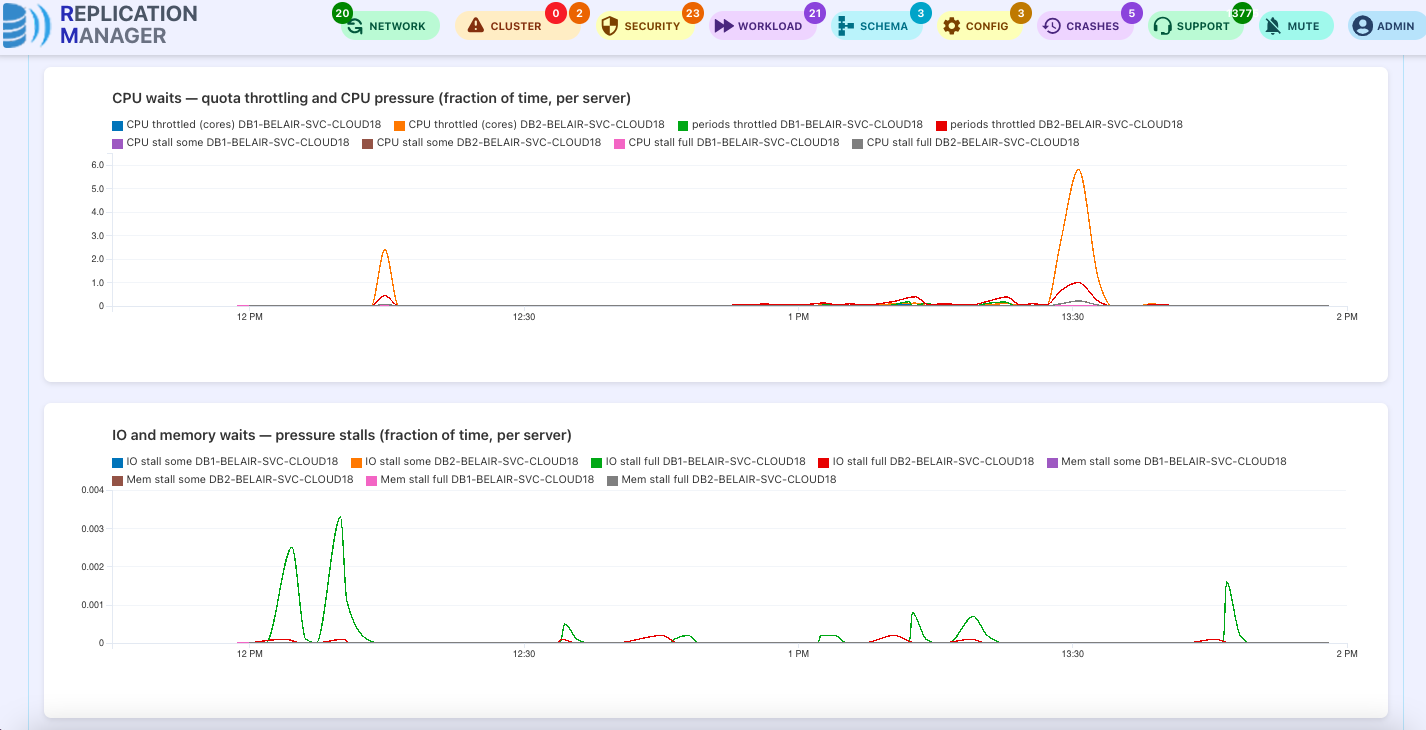
What the new wait metrics changed on belair. The resource sensor now reads, next to the CPU, memory and IO consumption of each database service, what the kernel knows about waiting: the quota throttling and the pressure stalls of the service's cgroup, graphed per server in Graphs → Resources. On belair those curves stayed flat under load: at 16 clients the server used half a core of its two and the kernel saw no stall, yet each transaction took 213 ms. The wait was not in the kernel's view. The monitor's own series told it: the semi-synchronous acknowledgment, graphed from the server's own counters next to the thread pool size, costs 12.3 ms per commit on belair (encrypted redo and binlog on both sides), and with one thread pool group per core a group waiting for its acknowledgment blocks every other transaction of its lane. From there the configurator rule followed: under semi-synchronous replication, whether it is enforced by replication-manager, declared by the configurator tag or simply observed on the servers, the thread pool gets four groups per core, applied live through the dynamic resize, no restart. The same small plan, 2 DBU per node, went from 74 to 395 transactions per second, 5.3 times, with the encryption and the semi-synchronous replica untouched. The two bars in the middle isolate the other half of the story: the container had been capped at one core by an old docker argument although its slice said two, which the same metrics exposed and a rolling restart fixed.
2. CLOUD18
MCP, on Cloud18. The same server on a Cloud18 instance adds the marketplace side. The assistant registers the instance and confirms it, lists the infrastructures, the subscription plans and the clusters for sale with their price, creates a cluster or changes its subscription, mints a cluster token. Then applications: deploy an app from the template library next to its database, the database schema and user created for it at provision, start, stop, restart or resize it, list what runs. Every tool stays under the same per-user ACL as the GUI.
Self-service clusters. On a registered Cloud18 infrastructure, OpenSVC or Kubernetes, a Cloud18 identity can create its own cluster, off by default and under the provider's veto script. The cluster is born with dynamic resources on.
Units, plans and their monitoring. Everything a cluster takes on the infrastructure is counted in units, each with its own ratio, its plan and its series:
| Unit | What one unit is | Plan | Monitoring |
|---|---|---|---|
| DBU, database | 1 core, 4 GB of memory, 20 GB of disk, 1000 IOPS, all coupled | the cluster's DBU plan; a grow over it is refused with its state (ERR00112), within the over-commit allowed | consumed DBU per node and per axis, cpu, memory, IO, disk, read from the cgroup sensor; the service's real resources and its waits next to them |
| APU, apps and proxies | 1 core, 2 GB of memory, 10 GB of disk, no IOPS | the cluster's APU plan | consumed APU per app and proxy, per axis, with the service's resources |
| BKU, local backups | 20 GB of local backup disk | the cluster's BKU plan (prov-db-bku); above it, a state (WARN0225), monitored as over-commit, never blocked | local backup bytes and BKU, billed BKU |
| BAU, remote archives | 20 GB held in a remote archive | no plan: tracked and billed on usage | archive bytes and BAU, as consumer, and as producer for a cluster whose storage apps host archives for others |
| GWU, gateway bandwidth | 100 Mb/s through the Cloud18 gateways | the gateway capacity shared by the clusters on it; 10 GWU (1 Gb/s) free per cluster | Mb/s and GWU, the part on top of the plan, and the traffic moved above it in Gbit |
Each unit has its chart in the cluster's Graphs page, Resources section, the plan drawn on it.
The global Resource Manager. One ledger for the whole instance, behind the global admin grant, over the same metal seen through the DBU, APU and BKU ratios. It answers three questions:
- What can still be reserved. The plan pot: the capacity times the quota, minus every plan of every cluster in every unit. A plan increase is admitted only against it, then
prov-plan-increase-scriptmay still refuse it; consumption plays no part, only other plans bind a plan. - What gates a self-service cluster. Its default units, 2 ×
prov-db-dbuin DBU andprov-service-plan-apuin APU, must fit in what the infrastructure has free; otherwise the creation is refused with the numbers, unlesscloud18-self-service-clusters-can-borrowlets it be created on borrowed capacity, said so in the answer. The provider'scloud18-self-service-clusters-enabled-scriptcan veto it in any case. - What caps a dynamic grow. Within its plan a grow is always free. Above it, every node must pass three checks: the over-commit ceiling the client accepted, plan × (1 +
prov-db-overcommit-pct); the node's free pool, its consumption plus the grow under what the node can give; and the client'sprov-db-resource-raised-over-plan-script. One refusal refuses the step for the cluster, with its state (ERR00112). The plan ledger does not gate a grow: when a plan increase takes space that was lent, the clusters borrowing it get a warning and shrink back toward their plan.
Per cluster, the page shows its plan, what it consumes, its over and under units, what it borrows and gives back, and its month statement.
Prometheus. The resource usage in units is exposed on /api/prometheus too: per database instance the consumed DBU and each axis (dbu, dbu_cpu, dbu_mem, dbu_io, dbu_disk), the service's resources and its waits, labelled by cluster and instance, and the cluster's plan_dbu.
2.1 OPENSVC
MySQL and Percona Server 8.4. 3.1.45 provisions and restarts MySQL and Percona Server 8.4 under OpenSVC with GTID replication on from the generated configuration: gtid_mode, enforce_gtid_consistency and relay_log_recovery are applied whatever the version, legacy and modern replication option names both carried, the MySQL 8 undo tablespaces kept where the instance and xtrabackup expect them. Validated end to end on a two-node Percona Server 8.4.11 cluster: restarts driven by replication-manager, SOURCE_AUTO_POSITION=1 replication resuming with zero lag, gtid_executed identical on both nodes.
Dynamic resize on every axis. Disk grows and shrinks through the orchestrator, IOPS and memory shrink toward the plan on sustained under-use, every move a tracked state. The declared disk used to be a number set at provisioning. Now it is a live axis, like memory and CPU: when a node's data outgrows the declared disk, the declaration follows the measured datadir, and the volumes grow through OpenSVC's own resize action, no restart, no reprovision. After sustained under-use the disk shrinks back toward the plan, never below it and never below the peak data plus a safety margin. A resize the orchestrator refuses is a tracked state with its warning, cleared by the next resize that lands, never a silent failure. Shrinking needs a recent OpenSVC v3 agent where the quota moves with the size.
Applications next to the database. Templates ask the cluster for their own schema, user and password with {{app.db.*}} keys, never overriding an existing one; linked apps reference a sibling's credentials; S3 mounts on an in-cluster object store; ERPNext as seven linked apps, Forgejo, phpMyAdmin, Adminer among the templates; per-app start timeouts. Deploy, start, stop, restart and resize from the GUI, the API or the MCP server.
The templates you can deploy today, from the public library https://github.com/signal18/cloud18-templates:
| INFRASTRUCTURE | ||
| RDBMS | MariaDB, MySQL, Percona Server, PostgreSQL, Microsoft SQL Server | MariaDB, MySQL and Percona Server are the cluster's own databases, provisioned, replicated and monitored by replication-manager. PostgreSQL joins them in 3.1.45 in three topologies, active-passive, WAL streaming, logical replication, sized by the same configurator rulesets. SQL Server as a single instance that owns its data |
| NoSQL and caches | Valkey, Memcached | Valkey (the Redis fork) with a persisted dataset that moves with the instance, Memcached one instance per agent |
| Proxies | HAProxy, ProxySQL, MaxScale | The cluster's proxies, routed to the primary and the replicas, reloaded on every topology change |
| Queueing | RabbitMQ | Queues persisted on a volume that moves with the broker |
| Object storage | RustFS, MinIO | In-cluster S3 for the apps' shared files, the cluster's S3 provider |
| PRODUCTIVITY | ||
| ERP | ERPNext, Dolibarr | ERPNext runs as one app per process: backend, frontend, scheduler, websocket, worker; both with their database and user created by the cluster |
| Framework | WordPress, Grav | WordPress on MariaDB with its database created by the cluster, Grav flat-file without a database |
| Chat | Mattermost | Mattermost Team Edition on PostgreSQL, its database and role created by the cluster |
| Ticketing | FreeScout, GLPI, osTicket | Help desk, IT service management and support tickets, each with its database and user created by the cluster |
| DEVELOPMENT | ||
| Tools | Forgejo, phpMyAdmin, Adminer | Git forge with its schema and user created by the cluster; the two database tools connected through the cluster's proxies |
| Code | PHP, Java, Next.js, Python, Go, .NET, Nginx | Each on a public image, your code cloned from your git repository at start, Nginx for static content and configuration from git. Every runtime ships the same sample page, "Hello world, I'm connected to database server id N", answering from the cluster |
PostgreSQL on OpenSVC. The postgres, postgres-standby and postgres-peer templates deploy a PostgreSQL primary, its WAL streaming standby or a logical replication peer as failover apps: one instance whose volume follows it across the nodes, sized by its plan (memory, autovacuum, workers) and monitored as a server of a PostgreSQL cluster.
Resource units for the whole stack. Next to DBU for databases: APU for proxies and applications, measured from a per-service cgroup sensor; BKU for the local backup storage against a per-cluster plan; BAU for the remote archive, its own unit; GWU for the bandwidth taken through the shared gateways, tracked never invoiced, with several gateways active at once. The Resource Manager page shows each family with plan, consumed, borrowed and given back.
Gateway monitoring, in GWU. The applications of every cluster reach the outside through the Cloud18 gateways of the infrastructure, and those gateways share one uplink. 3.1.45 tracks the bandwidth each cluster takes through them, in and out, read from the gateways' own HAProxy statistics. The unit is the GWU, the gateway network unit: 1 GWU = 100 Mb/s of bandwidth, so a 1 Gb/s gateway is 10 GWU. The plan of a cluster is the gateway capacity divided by the clusters present on that gateway; above its plan a cluster borrows, below it gives away, the same vocabulary as DBU for databases. The Resource Manager page gives the gateway its own section, consumed GWU per cluster stacked under the capacity of the gateway, which is the picture that tells you when to add a gateway. Several gateways can be active at once. It is tracked, not invoiced, unless the provider sets a price.
2.2 KUBERNETES
The image you run is the image you keep. The release a declared database image resolved to is pinned in the Deployment; a rolling restart re-renders it with the image the service runs, and only a rolling upgrade moves it.
Resource readings with one clock. The resource sensor uses the same freshness window on OpenSVC and Kubernetes: a reading older than three minutes is no reading, and no resize is decided on it.
Disk resize. A bigger declared disk is applied on Kubernetes by a scheduled reprovision.
3. SECURITY
3.1 IN 3.1.45
The database configuration is no longer served without authentication by default. The configuration archive a database fetches at start holds its credentials and TLS keys. Since 3.1.43, api-credentials-secure-config defaults to true: the archive needs a token, anonymous requests get a 403. Up to 3.1.42 the default was false: if you run an older release, set it to true, or upgrade.
API tokens. Scripts, CI jobs and the MCP server authenticate with tokens issued by a user, carrying a subset of that user's grants, never more, stored encrypted.
3.2 IN 3.1.44
Replication TLS that follows the primary. With replication-use-ssl, every CHANGE MASTER used to carry MASTER_SSL=1 and nothing else, and a CA left in a replica by an earlier certificate cut the channel as soon as the primary changed certificate. 3.1.44 reads the primary's certificate live at each CHANGE MASTER: MariaDB 11.4+ zero-configuration TLS (an auto-generated certificate verified through the replication password, no CA to distribute), the CA of your own certificates (replication-ssl-ca, or the one shipped with the ssl tag), or MASTER_SSL=0 toward a primary without TLS, which keeps an 11.4+ replica replicating during a rolling upgrade from 10.11. Two new security states watch every channel, managed or set by hand: encrypted but unverified, and TLS handshake failed. Tested on our three-node test cluster, including a rolling upgrade from 10.11 to 11.8 then TLS switched on, replication healthy at each step.
Behaviour change: the ssl tag no longer brings strictssl. A tag matched other tags ending with the same name, so ssl also enforced require_secure_transport. If you relied on it, add the strictssl tag explicitly.
No root password in the rendered database configuration. Galera state transfers use a unix_socket account created at datadir init instead of wsrep_sst_auth with the root password; any other line that would carry the password is commented out, naming its key. Rendered Galera topologies need MariaDB 10.4 or later.
Access control. A user who can delegate rights but is below sysops can no longer rewrite a sysops account; the admin account keeps its rights on a newly added cluster; the internal service account gets only the resource sensor grant it needs, on every cluster; the default visitor role is dropped when a real role is granted.
A restore never overwrites a node holding data. The automatic reseed only fills a node proven fresh: installed with its current start, every schema visible to the monitoring account, no user schema, on MariaDB, MySQL and PostgreSQL. Any other node is refused with a warning and left to an operator. A fresh node gets the data without the backup's system tables, so an older backup never breaks a newer release, and the accounts are replayed from the primary.
Passwords no longer reach the binary log in clear. On MariaDB, the accounts replication-manager creates or changes (app databases, password rotation, a monitoring credential changed in Vault) now get the password hash, never the password: MariaDB writes account statements to the binary log as it receives them, so the password used to end up in the binlogs, the replicas' relay logs and the backups. And what comes back from the servers, a replica's replication error, the processlist, the error, SQL error and slow logs, the lost-events viewer, has its password literals masked before it is stored, logged or shown in the API and the dashboard. Low severity, it takes a statement with a clear password in the first place, but replication-manager's own account creation was one: rotate the passwords of the accounts an earlier release created. Checked on MariaDB 10.11, 11.4 and 11.8.
4. ALSO IN 3.1.44
- Config plugins, and a fix one click away. A server upgraded to a new release without
mariadb-upgradekeeps the system tables of its old one, and every logical backup of it then fails (Column count of mysql.proc is wrong, seen on our preprod after an 11.4 to 13.0 upgrade). The newconfig-system-tablesplugin reads it from what is already observed, the last backup and the server's error log, raises an error in the Config view, and closes it by itself once a backup goes through. Its Remediate button runs the new server action: the server's jobs container runs the upgrade tool of the server's own release, on the system tables only, without the binary log. - Galera provisioning serialized node by node (bootstrap, then one state transfer at a time), the declared topology kept by discovery, the full start bootstrapping the last known master.
- A resource change never reprovisions: dynamic resources are the remediation.
- SMT gain: a DBU core is a real core, measured on the replication-manager host with the embedded sysbench.
- Cloud18 quote in MCP: the units a cluster needs and its price on every partner infrastructure, every flavor creatable (MariaDB, MySQL, Percona, PostgreSQL).
- Active/standby: bootstraps fall back to the DR replication-manager, and the standby imports the clusters created on the active.
Read more:
- splitdump, backup settings and local backup encryption: https://docs.signal18.io/maintenance/configuration-guide/backups
- backup progress and the internal network view: https://docs.signal18.io/provisioning/dynamic-resources
- application templates and the app lifecycle: https://docs.signal18.io/provisioning/apps
- the MCP server: https://docs.signal18.io/usage/mcp
- API tokens: https://docs.signal18.io/security/api-tokens
- replication TLS, certificates and account passwords: https://docs.signal18.io/security/configuration-guide
- config plugins and the system tables upgrade: https://docs.signal18.io/plugins/config-plugins
- everything in 3.1.45 and 3.1.44: https://docs.signal18.io/change-logs/features31
#MariaDB #MySQL #PostgreSQL #HighAvailability #DBaaS #OpenSource #Cloud18
5. WHAT'S COMING NEXT
Point-in-time restore, tested on every archive. The regression test that proves a backup comes back from the archive under load gets its point-in-time twin, on each archive plugin: a backup and the binlogs after it fetched back from restic, plakar or Proxmox Backup Server, replayed to a given time, the server ending at the primary's GTID of that moment and keeping its replication link, with a state saying where it stands.
ClickHouse and DuckDB child clusters. The replication plugins that feed a ColumnStore child from its MariaDB parent are a family: the next members feed a ClickHouse or a DuckDB child, an analytics copy of a production cluster kept in step by replication-manager, provisioned, seeded and supervised like any child cluster.
TidesDB child clusters. The configurator is ready: the tidesdb tag renders the engine's configuration and sizes its cache, write buffers, flush and compaction threads from the plan. It is not yet available as a child cluster: we are waiting for a MariaDB Foundation Docker image that ships the TidesDB plugin.
More change data capture, as plugins. The same plugin family carries a cluster's changes out to other consumers, Kafka first.
replication-manager in space. Satellite links are rarely cut cleanly: latency that moves, jitter, packet loss, a short cut at every satellite handover. We are building degraded-link test profiles, applied to the database, proxy and monitor networks, to prove with reproducible numbers that a cluster survives them: low-orbit nominal (25 to 40 ms, 0.1 % loss) and handover (a 0.5 to 2 s cut every 15 s) with no false failover and no split brain; degraded links where the monitoring never stalls; long outages of a site with a clean rejoin and no divergence; one-way failures detected; and geostationary links (550 to 650 ms) to say which features still hold. Each profile becomes a regression scenario, with recommended settings for satellite-linked clusters.
TEST REPLICATION-MANAGER FIRST ON CLOUD18
Free credits for 3 months. Try replication-manager on a Cloud18 cluster before running it on your own infrastructure: we offer 2 DBU, 4 APU and 2 BKU for 3 months of usage, and more depending on your load.
- 2 DBU, the database: 2 cores, 8 GB of memory, 40 GB of disk, 2000 IOPS.
- 4 APU, apps and proxies: 4 cores, 8 GB of memory, 40 GB of disk.
- 2 BKU, local backups: 40 GB of backup disk.
The units are defined in the table of section 2.
On our partners' infrastructures:
- BSO: https://dbaas-fr-1.bso.cloud
- RapidSpace: https://dbaas-fr-3.signal18.io
- Rdem: https://dbaas-fr-4.signal18.io
- Sagacita: https://dbaas-fr-1.sagacita.com
To get your credits, contact sales@signal18.io.
Direct from MCP after registration. Connect your AI assistant to replication-manager's MCP server, register with cloud18-register and your email, click the confirmation email, then ask for get-cloud18-infrastructures: it gives, for each infrastructure, what you may create there and a ready-to-paste MCP entry. Connect to it and cloud18-create-cluster creates and provisions your cluster, the database, its proxy and the apps you name; cloud18-create-cluster-token gives you the token to operate it. The prompt cloud18-onboarding walks the assistant through the whole flow.
THANKS
To the clients who were part of these releases through their support cases, on splitdump, child and staging clusters: Voltalis, BSO, CCM, Pradeo and Météo Consult. Your production questions became our test cases.
To HackChang (@hackchang), who reported responsibly that the database configuration archive could be fetched without a token (GHSA-m3ph-v4wm-xg2g): the token is required by default since 3.1.43.
To our contributors: Ahmad, on backups, reseeds and the marketplace; Pascal Valois from BSO, who started the MCP server and its token authentication; and Claude, Anthropic's AI, that wrote and tested a good part of this code with us.